Your Nepali date,
right on your desktop.
वि.सं. मिति, ई.सं. मिति, तिथि र नेपाल सरकारका सार्वजनिक बिदाहरू सिधै तपाईंको स्क्रिनमा।
Check today’s Bikram Sambat date in an instant without loading a website.Mero Desktop Patro delivers a compact floating desktop widget and full monthly calendar built natively for Windows 10 and 11. Fast, reliable, and completely offline.
Test the desktop widget live.
Switch presets, test acrylic glass surfaces, toggle lunar Tithi badges, and test corner docking in real time.
Everything you need in a desktop calendar.
Nothing you don’t.
Engineered for Windows users who want fast date access without browser tabs, ads, or background bloat.
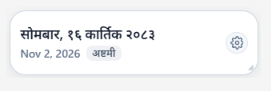
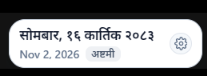
Floating Glass Widget
An ultra-compact desktop pill built with acrylic glassmorphism. Switch between Compact (216×56), Standard (254×70), and Expanded (300×86) presets, or drag the corner grip to resize freeform.
Automatic Snapping & Memory
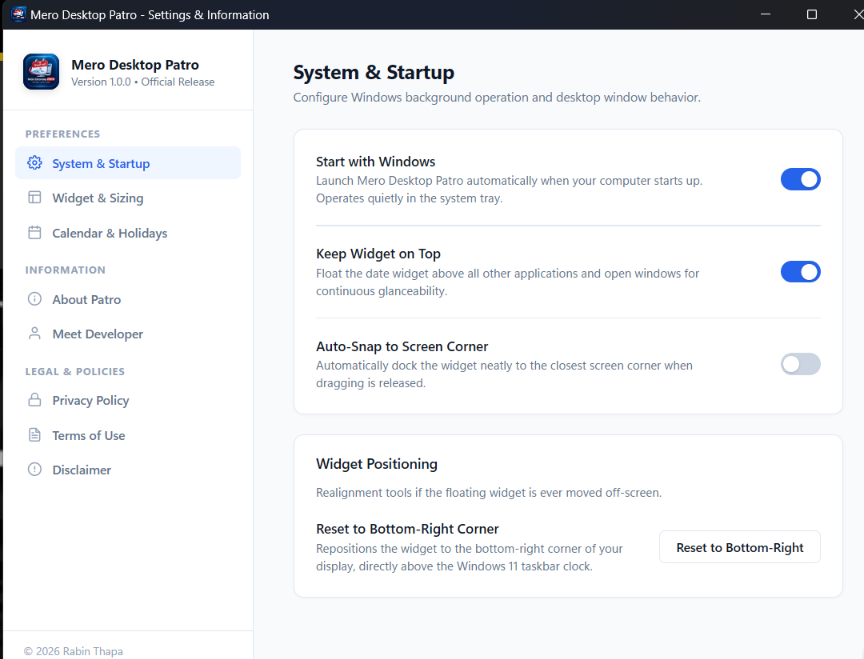
Docks directly above your Windows taskbar clock. Snaps to the nearest screen corner upon release, clamps to 12px work area margins, and saves exact screen coordinates in %APPDATA% across reboots.
Dual Calendars & Lunar Tithis
Tested and verified across 1,092 months (BS 2000 to BS 2090). Pairs Bikram Sambat (वि.सं.) with Gregorian (AD) and Nepal Sambat (ने.सं.). Displays astronomical lunar Tithis on every date cell.
Nepal Government Holidays
Crimson Saturday weekends and gazetted public holidays. The Day Inspector card provides event details on click, while the monthly highlights ribbon summarizes all upcoming festivals.
Unified Settings Architecture
Single-window split-view design. Configure Windows autostart registry integration, Always on Top window pinning, display toggles, and view local legal compliance in one window.
100% Offline & Under 30 MB RAM
Built with Tauri 2 and Rust native backend. Standalone installer is 4.4 MB with under 30 MB memory consumption. Zero telemetry, zero analytics, zero external network requests.
Interface and Design
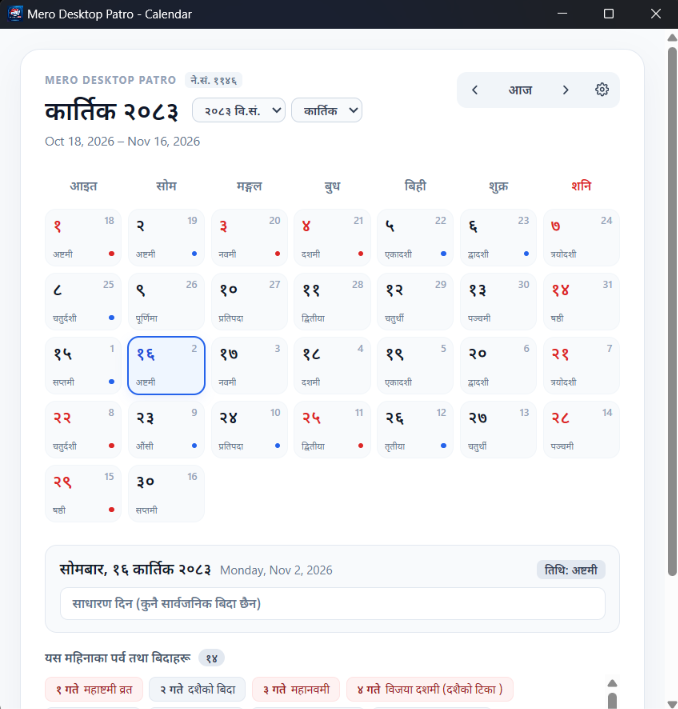
High-resolution screenshots of the monthly calendar, floating desktop widget, and unified configuration system.
Monthly Calendar View
A 7-column layout designed for Windows desktop displays with complete cultural context.
Bikram Sambat & Gregorian
Dual date indicators with clear Devanagari numerals.
Astronomical Tithi
Lunar phase indicators (एकादशी, औंशी, पूर्णिमा) on every day.
Crimson Saturday & Holidays
Instantly distinguish weekends and official government holidays.
Day Inspector
Click any date cell to view the full cultural card and event metadata.
Monthly Highlights Ribbon
Quick-access festival chips for immediate focus on major holidays.
Bidirectional Date Converter
Convert between Gregorian (AD) and Bikram Sambat (वि.सं.) instantly. Powered by the offline calendar engine shipped inside Mero Desktop Patro.
Supports dates from AD 1943 to AD 2033 (BS 2000 to BS 2090).
Built for rapid keyboard control.
Navigate months, return to today, and close windows without lifting your hands from the keyboard.
Previous Month (अघिल्लो महिना)
Browse backwards to the preceding Nepali month.
Next Month (पछिल्लो महिना)
Browse ahead to the following Nepali month.
Jump to Today (आजमा जानुहोस्)
Realign the calendar grid to today’s active date.
Dismiss Window (बन्द गर्नुहोस्)
Hides the full calendar window and returns focus to your desktop.
Native Context Menu
Right-click anywhere on the widget for quick size presets, docking, and settings.
Freeform Resize
Drag the corner handle to resize the widget to your display setup.
Why native desktop beats web tabs.
Mero Desktop Patro runs locally as an independent Windows application with minimal memory overhead and zero network reliance.
| Metric | Mero Desktop Patro | Web Patro Sites | Electron Calendars |
|---|---|---|---|
| Memory Footprint (RAM) | Under 30 MB (Tauri 2 and Rust) | 350 MB+ (Browser Tab) | 220 MB+ (Chromium Engine) |
| Startup and Launch Speed | Instant (< 200 ms) | 3 to 5 seconds (Page Load) | 4 to 8 seconds (Cold Boot) |
| Offline Execution | 100% Offline (Local database) | Requires active internet | Often requires cloud sync |
| Standalone Installer Size | 4.42 MB (NSIS installer) | N/A (Reloads assets every visit) | 85 to 130 MB setup |
| Ads, Popups, and Trackers | Zero ads, zero telemetry | Ad banners, tracking cookies | Promotional upsells |
| Windows Desktop Integration | System Tray, Autostart, Corner snap | None (Confined to browser) | Basic window controls |
| Position Persistence | Saves exact coordinates across reboots | None | Standard window memory only |
Technical Specifications
Architecture & Deliverables
Development Roadmap
Direct standalone modal Date Converter tool with quick clipboard copy.
Customizable acrylic opacity sliders and Windows accent color modes.
Local custom reminders, notes, and offline festival notifications.
Frequently Asked Questions
Direct answers regarding installation, offline operation, and privacy.
Is Mero Desktop Patro free to use?
Does the application require an active internet connection?
Which versions of Windows are supported?
How do I keep the widget visible above my open apps?
Does Mero Desktop Patro collect any usage analytics?
How do I reset the widget position or uninstall?
Keep the Nepali date close.
आजै आफ्नो विन्डोज कम्प्युटरमा इन्स्टल गर्नुहोस्। पूर्ण रूपमा निःशुल्क र सुरक्षित।
Download the official installer for Windows 10 and 11. Instant Bikram Sambat date access right from your desktop, with zero telemetry and zero network dependency.